Reading RPG books without wanting to die

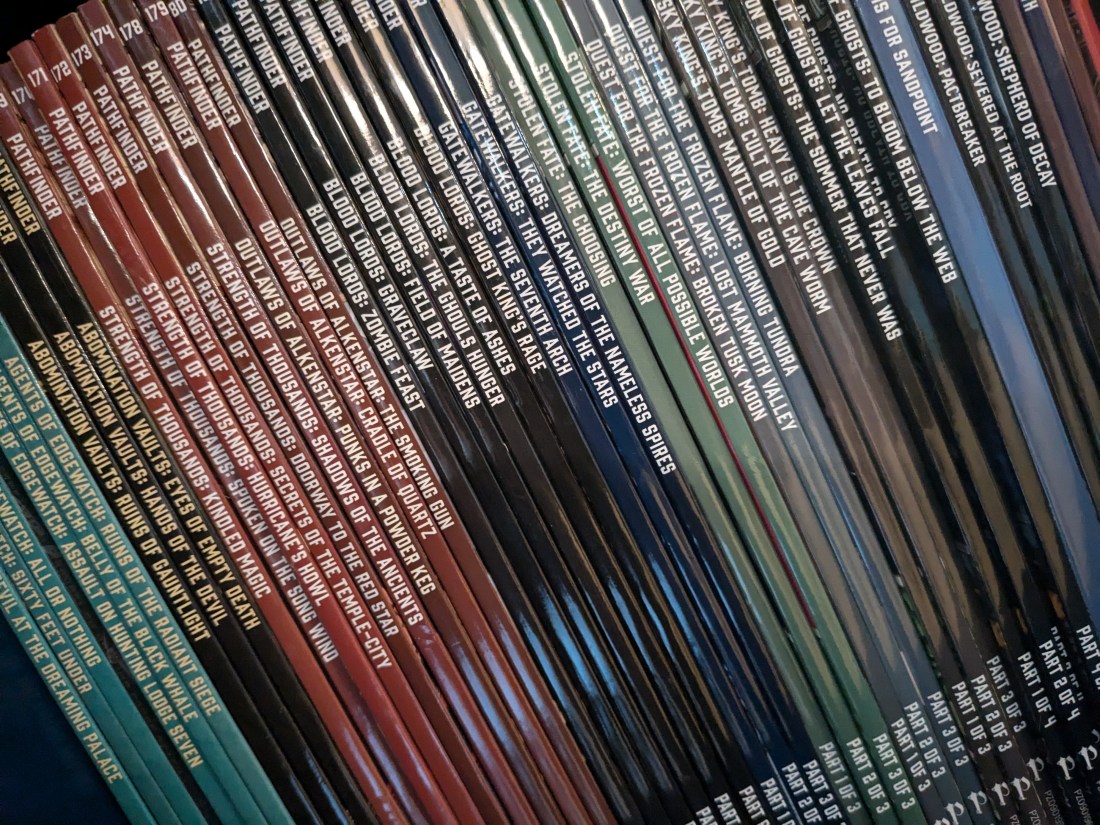
I’ll open this with admitting something: I was never someone who read RPG books front to back. Though I rarely shied away from a challenge, I assumed that I’d pick up what I needed as I went. If I was going to build a character, I’d look at that section. If I was GMing, I’d glance over a few potentially pertinent areas, download some cheat sheets, and look up stuff as I went. To be honest, this had worked fairly well for twenty years and across multiple systems.

What changed was one of my players who was audacious enough to have a birthday, and wanted to play in a system I’d never run before. This left me with a tighter timeline than normal, and only one shot to really get it right. Therefore… I had to actually read the book. Even though it was a crunch, I ended up enjoying the process, and found myself looking at my bookshelf filled with TTRPG books and wondering if I should start tackling them properly.

A year and thirteen books later, I’ve come down to some tricks that help me read TTRPG books at a somewhat reasonable rate. It’s not fast, but it gets the job done!

Goals

I don’t read RPG books like I would read, say, a textbook for a class. I know that I can always look things up later, and I have no problem telling my players that I’m going to pause to look up a rule. My goal is to know that a rule exists. I don’t need to know exactly how flanking or soft cover works the first time I run a game, but I should know that both are absolutely a thing. I don’t need to memorize pages of spells, but I should know the general mechanics behind casting.

I also stop reading when I can feel my attention drifting. Outside of the birthday game, I’m not under a time crunch, so it’s best if I close the book for the day and come back to it when I have the cycles to take in what I’m reading. My goal is not “finishing the book in record time” but “finishing the book with enough knowledge to run a session.”

Tools

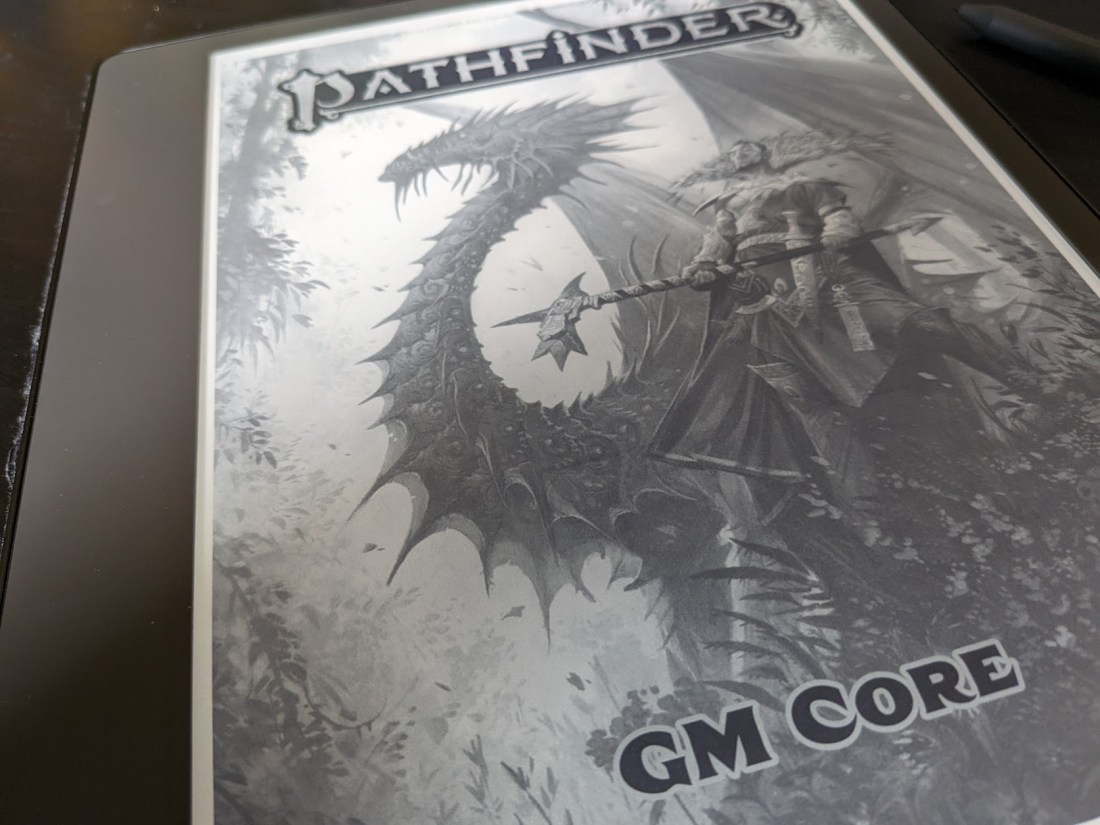
Kindle Scribe. As I’ve stated before, the Kindle Scribe was a game-changer for me when it came to reading RPG books out there. There are other large-format readers out there, of course, but I don’t have hands-on experience with them.
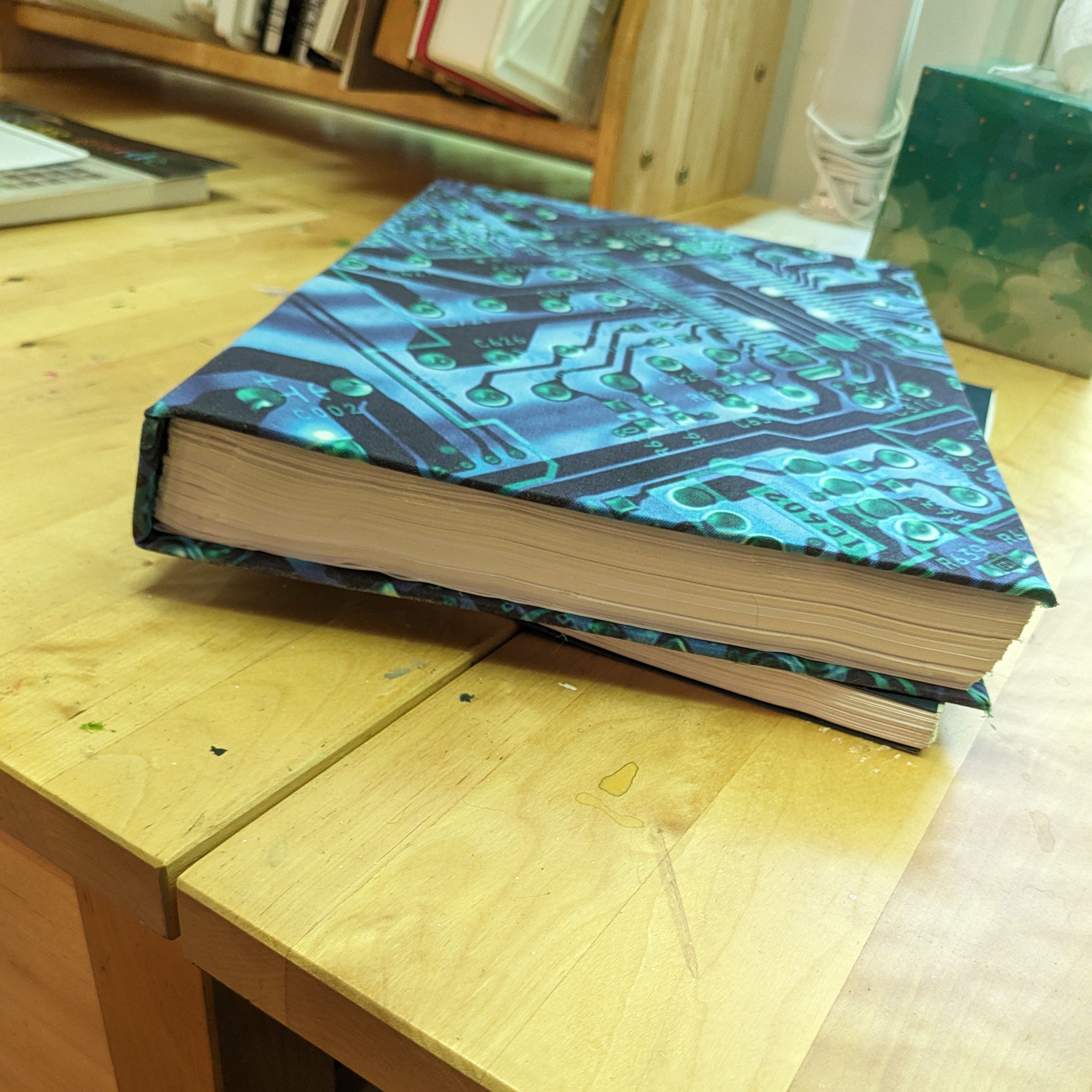
Books I actually bound!

Paper and highlighters. If I can’t use the Scribe for some reason, then I consider printing the book out and using highlighters. This isn’t a complete waste for me, because I’ll often bind the book into a format that can sit on a shelf.

Flags and highlighter tape. If all I have is a physical copy of the book, I’ll fall back on flags, transparent sticky notes, and highlighter tape. No, I can’t just read the book, okay?

Method

Note: This is the method that works for me. It’s not perfect, but it’s what works for the time and attention levels I have.

I skip stuff. I totally skip anything that I’m likely to go into depth on later.

  • Feats: If I’m GMing, these are rarely something I have to consider. If I’m playing, I’ll look at the ones that apply to the character I’m building in the moment.
  • Spell lists: As a GM, I’ll use spells, but I can hold off reading them until I’m planning for a session.
  • Stat blocks: I do read bestiaries, but mostly for the flavor. I skip stat blocks until I’m going to actually use a creature.
  • Equipment lists: Again, these are rarely something that I need to know about until I’m actively planning for a game or running a character.

There’s a few benefits to skipping all of these for me. First, it makes the books go by a lot faster. In crunchy systems, tables of gear and spells can take up a significant amount of the page count. Second, it gives me something that I can look forward to discovering later! I love leveling up and combing through spell lists to find cool options I’d never seen before. If I already know all the options, it can start to feel a bit boring.

I dive deep elsewhere. Of course, I pay close attention to the general rules, but some sections, I’ll really hone my focus, even breaking out stickies or a notepad if need be.

Combat is a big one to read carefully for me, since what players do in the first combat can often end up set in amber. I’m not shy about correcting rules we read wrong, but human behavior is weird. It can take a while to get them out of the habit of thinking they can totally do X each turn.

I also like looking carefully over subsystems, but for a different reason: They don’t come up that often if you don’t know about them! That sounds obvious, but seriously, it’s easy to put together combat and social encounters and then try to cobble more complex situations with a couple of random DCs. The designers put together something much cooler, though! Use it!

Also, I tend to read the GM-centric sections a few times. It’s tempting to skip them if you’re experienced GM, but for the love of all that’s good, please don’t. Every system has a different way of balancing itself, and it’s important to buy into that before the first die is rolled.

So, in short:

  • Skip anything that’s just a long list (feats, spells, equipment)
  • Read the general rules (So, how feats work, how spells work, how to buy equipment, etc)
  • Read combat carefully so you don’t screw it up out of the gate
  • Read the GM sections carefully so you understand the game philosophy

Imma repeat that caveat

This is the system that works for me. I’m more than happy to skip certain sections, but if reading them brings you joy, you do you. If you’re not planning on ever GMing, you can totally skip the GMing sections! If you prefer to learn combat by watching a bunch of videos, have at it. I’m only putting what I do out there because I get asked from time to time, and I got tired of writing out the same reply over and over.
Kindle Scribe: A Game Changer for Reading TTRPG Books

I spent a good part of last year dithering over whether I wanted to buy a Kindle Scribe or not, mostly for reading TTRPG books. I searched for anyone who had used theirs in the same way, but came up empty. Finally, an upcoming trip and a sale tipped the scales, and I bought one. So, in the interest of being the change you want to see in the world, I’m going to write the post I wish I had been able to find.

Why the Scribe?

Why did I hone in on the Scribe versus any other option?

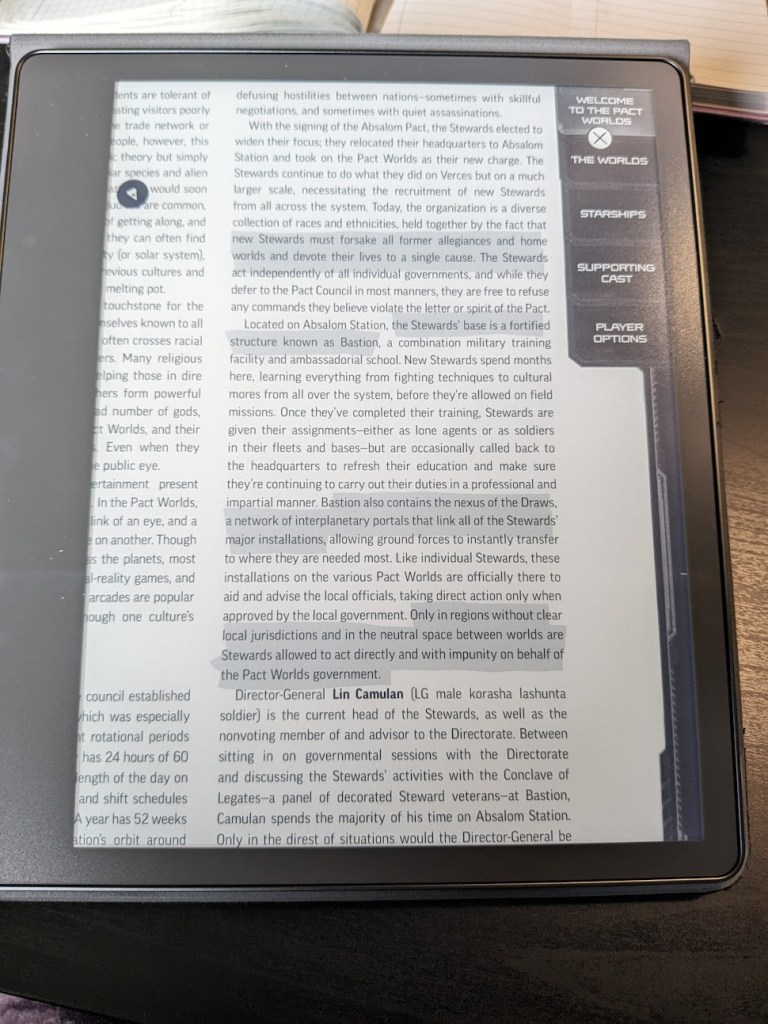
My Kindle with Starfinder Pact Worlds, minimized, loaded, showing highlighting and zoom

Large format. The larger screen works super well for PDFs and image-rich documents. You can technically read PDFs on the smaller Kindles, but it really doesn’t work well for heavily formatted documents.

Highlighting and notes. With RPG books, I have to highlight as I go. Even if I never go back and reference it in that format, it keeps me focused. Otherwise, I tend to space out, thinking about a rule or bit of lore I just read and how I could use it.

Paper-like surface. I read a few books on my iPad, but I found I really didn’t like reading on the glossy, bright surface. I got through the books, but after a few, I decided it wasn’t my bag. I also tried printing out a few PDFs, and while this worked a lot better for me, my tree hugger soul screamed at all of the wasted paper. I ended up binding the books so it wasn’t a complete loss, but I’d really love to not get glue everywhere again.

No distractions. I do read PDFs on my computer regularly, but I’ll be the first to admit that I can get distracted when the whole world is one alt-tab away. This is fine with prepping APs, but for bigger books, I’d prefer to stay focused.

Weight. It’s so light! Like, stupidly light, even with the nice cover! And it’s still small enough to fit in one of my bigger purses with ease. I recently went on a cruise, and I barely noticed it in my bag. My paperbacks weighed more!

Zoom. You know what you can’t do with paper? Zoom in. As my eyes age, this is becoming more and more important for taking in information quickly. It’s easy to waste too many cycles squinting.

Backlight. Light is also important for aging eyes. Sometimes, finding a lamp is inconvenient.

Downsides

As always, it’s not all kittens and sunshine.

PDF size. You have to minimize RPG PDFs if you want them work on the Scribe. Technically, they’re not over the limit as is, but the Scribe will start to choke. You can do this for free on various websites (Adobe, I love PDF, Small PDF), but it’s still annoying to have an extra step.

Sideloading. If you want your PDF on your Scribe, you might have to use an Amazon service. Technically, you can sideload, but I’ve had better luck using the Email to Kindle service. It’s free, but it still makes me slightly nervous, since it’s possible for services to get shut down.

Amazon ecosystem. The elephant in the room: You’re feeding the Amazon beast. For some people, this is a deal breaker, even if you never buy one of their ebooks.

Cost. It’s cheaper than other options, but it’s not cheap, especially if you’re getting it for just one purpose. And you’ll want to get a cover as well for protection and pen storage, and they can get spendy.

Greyscale only. It’s crisp, but it’s still grey. There’s rumors of a color Kindle coming, but friends, I have been reading those rumors for a good decade now. Don’t hold your breath.

Notes. This is a weird one… You can generally takes notes on the Kindle, but if you’re working on a personal PDF, this function is greyed out. So while you can write on the page, you can’t use the sticky notes feature.

Final thoughts

I love my Scribe, and don’t regret it, even if it was an expensive purchase. It revolutionized how many RPG books I could get through, since I was no longer squinting at tiny print or limiting my reading to when I had decent light and a comfortable reading position. I’m on my sixth RPG book of 2024, which is more than I’d read several years COMBINED. Also, I can highlight, which I’m loathe to do with a $60 physical book.

FYI: You know that warning people put on their blogs about affiliate links and possible kickbacks? I’m not a part of that program because I’m not cool enough.

Pathfinder 2e Ritual Calculator

Another day, another round of “Katie makes a tool because she hates little maths.”

I love Pathfinder 2e rituals. They’re legit one of my favorite parts of the game. A spell anyone can cast that you can pick up fairly early but comes with consequences if you actually try to use it right away? Delicious! I absolutely love to collect them and watch them blow up in my face.

One problem: Figuring out the DCs stresses me out when we’re in the middle of a game. Yes, it’s just two numbers, but they’re two numbers that really need to be right, especially since I also often have feats that change them. So… enter the calculator.

Features

  • If you pick a ritual rank, you’ll get the DCs for both the primary and secondary caster.
  • You can pick which feats you want to apply, which will modify the DCs.
  • Yes, it won’t stack the same bonus.

I think I got all the feats, but if I missed one, please tell me! Note that I’m only interested in ones that change the DC, not every single ritual feat.

Future updates?

Future updates are possible! There are a few things I wanted to add, but I needed to move on to another project. I really want to calculate the chance of success based on which casters you have and how good they are. I feel like this could help people really understand that you don’t cast rituals the second you get your hot little hands on them… or you do and just let all your dead friends be chickens.

And if you have any suggestions, let me know!

Population Generator 2.0: Now Online!

A few years back, I created a Python script that generated the population of a town, complete with family groups, jobs, wealth levels, and personalities. In the back of my head (and in that post, if we’re being honest), I needed to convert it to something that could run on a webpage. Well, here we are, a brief four and a half years later, and I finally finished it!

I’m somewhat competent in JavaScript, but I’m an expert at procrastinating writing it.

What it does!

The script was borne of the desire to have a town of people who already had names and stuff going on. There are a million town map generators out there, but I really wanted the people because my players always insisted on knowing the shopkeep’s name, ancestry, age, favorite soup, etc. I was tired of making it up on the fly. (Note: I did not add favorite soup to the script.)

The generated town is made up of families (a family is anywhere between a single adult to two adults and five children). Each family has a residence (ranging from ‘the street’ to a private estate), and every adult has a job. Every adult is given a random ancestry, a job, three personality traits, and a socioeconomic status (e.g., poor, struggling, middle-class, etc). If the residence is a shop, it’s given a name (easily my favorite part of the script). Then, we place the family in a ‘sector’ that usually matches their wealth level.

The tool lets you generate one family (displayed on the page) or a whole town’s worth, which you can download as a CSV (basically, text-based spreadsheet, which you can open in Excel / Google Sheets / Numbers / etc).

The Nitty Gritty

What’s the maximum size for a town? Bruh, that depends on your computer. This computation is happening on your end, not mine, so you can make some huge cities if you have a beast. My machine didn’t blink at a city of one million, but that may cause other browsers to crash.

Genders are male, female, and gender-neutral. The latter is a broad category and is up to the GM how they want to interpret it for an NPC. It might be someone who’s gender-fluid, doesn’t identify with any gender, is androgynous, etc. In the same vein, adult couples can be any combination of same-gender / opposite-gender, and pairings don’t affect whether they have children. The Serum of Sex Shift exists, after all.

Children’s ancestries are based on their parents, though I’ve decided not to get any more exotic than half-elves and half-orcs. If the parents’ ancestries match, the children match them. If they’re a human + orc/elf pairing, the children are half-orc/elf. Anything else, the children get a random ancestry from one of their parents.

The names are pulled from all over… and I wish I’d thought to keep the original sources. Some appear to have disappeared, and I have no record of others.

Traits are pulled from a random page from MIT, and I wish I had more context for it because it’s an awesome list.

Population percentages are pulled from an awesome Reddit post. u/VestOfHolding, wherever you are, whoever you are, you are awesome.

Find an issue? Have an idea?

Have a form. I make no promises about how quickly I’ll address bugs and suggestions because I plan on shifting to other projects. Still, I’m always open to expanding the script!

Katie’s RPG Toolkit

This is going to be a very unsexy post about the tools I use or created to help me prep, run, and play in games.

Storage

  • Dropbox is a must. And it’s not just for storage! You can also create file-request forms for things like updated character sheets or backstories. And being able to share out links to content is huge.
  • Google Drive, especially Sheets. My groups live and die by loot sheets in Google Sheets. It’s also where we keep shared notes if someone is going to play note-taker.

Character creation

  • Hero Lab – I use this so much as a GM. It’s spendy, but it’s awesome for being able to create characters quickly. I can also create campaigns that share my content with my players, which helps us get on the same page since I can restrict certain books or check certain settings.
  • Pathbuilder – While I don’t use it, I recommend it for players who don’t want to use Hero Lab or if I’m not creating a HL campaign for that game.

PDF extraction

  • TokenTool – Sometimes, it’s tricky to get maps out of Paizo PDFs. This is my ‘always works’ solution.
  • Python – I found this blog post while trying to DIY a solution for getting images out of PDFs and ended up using their script as is. It works great! It has problems with maps for reasons I keep meaning to look in to but never quite find the time for.
  • PDF-XChange – If I just need one image, this program gives me the option to right-click and save the image. Why don’t more readers do this?!
  • Script for cleaning text – Sometimes, my AP isn’t in my VTT of choice, so I have to create the NPC sheets myself. This script removes line breaks AND puts brackets around the dice rolls. Simple, but saves me a surprising amount of labor.

Tabletop

  • My VTT of choice is Roll20 – I run many systems, and it covers them all. Also, I don’t want to worry about hosting, especially since players poke their heads in randomly to set up their sheets.
  • Discord for video and audio – It just works. I pop out the video call and arrange my windows so it’s always up.
  • Watch2gthr for music on YouTube – I only use this when the music I want to use isn’t royalty-free. Otherwise, Roll20’s jukebox works fine for my purposes.
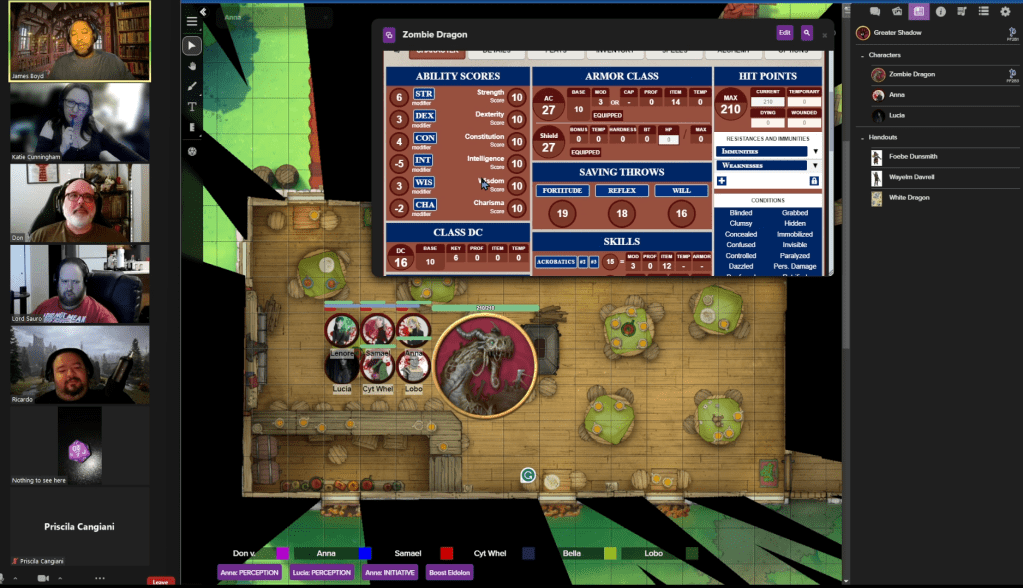
A shot from the Dhampirs game, where I was the backup recorder.

Image editing

  • Gimp – Free and it can probably do everything most people need. I know it works for me.
  • Token Stamp – I could use Token Tool but I prefer the controls here. Also, TokenTool isn’t on every machine in my house.
  • Icons8 Smart Upscaler – An amazing tool for making your maps look better when zoomed in. I use this mostly with older APs.
  • Icons8 for icons – I originally subscribed to Icons8 for professional work, but I quickly found them super convenient for tokens and markers! You can recolor them, give them borders, and they’re super clear even when you’re zoomed out.
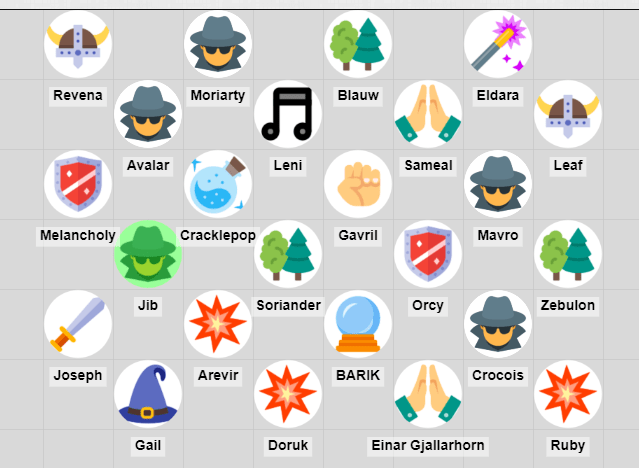
A collection of player tokens on a grid.
From our Extra Life game. I didn’t have time to set up bespoke tokens for everyone, so each class had a generic icon.

Music

  • I keep an eye on Humble Bundle when it comes to music. Every few months, they have bundles of royalty-free music that are made for games. These are great for when I’m going for a specific feel for a game. You’ll find them under the “Software” section, but make sure that you’re not buying a bundle for loops and sound effects (unless that’s what you really want).
  • When I don’t need super specific vibes, the music that comes with Roll20’s jukebox works perfectly well. Rat Battle and Baba Yaga will forever be a vibe.

Maps

  • CzePeku offers amazing maps that can fit so many scenarios. I’ve often come up with scenarios to use a particular map. Also, each map has variants, which can be super helpful in games for showing a change in location. So, the farm can go from day to night or from normal to bloody.
  • 2-Minute Tabletop is the other map-maker I patronize, but for the opposite reason: The maps are more module and generic (but still so pretty!) so I can build what I need.

Note taking

  • Microsoft OneNote – I don’t use this as much anymore, but back when I first started GMing, this was my ride or die. I still break it out when I need flexibility more than structure. In fact, writing this post made me realize it’s perfect for an upcoming project…
  • Cambridge Quad Wirebound Notebook – The absolute gold standard for graph paper for me. The pages are off-white, so they’re easy on the eyes, and the grid is the perfect amount of contrast. I buy these in bulk.
  • Google Docs – Easy to use, if you have a browser you have access to it, and you can share the doc for collaboration. What more do you need?

So, that’s my toolkit. It’s a lot, but I’ve been building it up over 20 years, so the list was always going to be long. If you use something you think I’ve missed, drop it in the comments!

Tarot and planning your next session

I want to start off things on the right foot: When it comes to tarot, I am at best a dilletante. I got into it back when I was in high school in the mid- to late-nineties, when there was a resurgence in interest in anything “New Age.” I had runestones, crystals, decks of all kinds, books on numerology, reading palms and tea leaves. I had pretty much everything but astrology.

Ya girl was woo as hell.

These days, I view most of those things as interesting, but tend to use them as tools in creative pursuits or self-reflection. If you’re a believer, trust me, I don’t mean any of what follows as any sort of insult, but you may want to skip the rest of this post.

For those of you who are still here, let’s talk about tarot and RPGs!

Tarot and planning

While most of the games I run are pre-written, I also run games that are completely homebrew plots. For these, I’ve found that using tarot as a kind of prompt has helped me come up with scenarios that I may not have reached for before because I’m a bit of a softie. Tarot cards are not soft.

The idea behind a tarot spread is that you lay out cards in a pre-determined pattern, with each position having a different question, and each card having a different meaning. If a card is reversed (upside down) the meaning is going to altered (usually worse, but not always). There’s a lot more that can go into it, but for our purposes, this is enough to work off of.

My favorite spread for this sort of planning is the Celtic Cross. I don’t use it quite like you might find in any guide, since we’re not looking to tell a fortune. We’re looking for inspiration. I don’t even try to use all of the cards. I use the ones that stick out to me as being potentially interesting for the game to pivot around.

Resources

You’ll need a few things to get started. Thankfully, they can all be found for free or cheap!

Cards: I love using physical cards (they’re just so pretty!), but you can find all sorts of apps and websites that will let you draw a random card. Just make sure, if you choose an app or a site, that the drawn cards are sometimes reversed.

A guide: There’s so many books, sites, and apps out there to tell you what all the cards mean. Hell, if you bought a deck, it’ll come with a little guide. The trick is finding a good one that hasn’t gone soft. Some modern guides try to put a positive spin on every card, and some even leave out the reverse meanings. We are not here to give your players a good time. We’re here for mayhem.

A quick way to see if a guide is soft? Look for their interpretation of The Tower. If you think “Hey, that doesn’t sound too bad,” put it back and keep looking. The Tower is pretty much always bad. I’ve linked some of my favorite resources at the end of this post.

The layout: The Celtic Cross

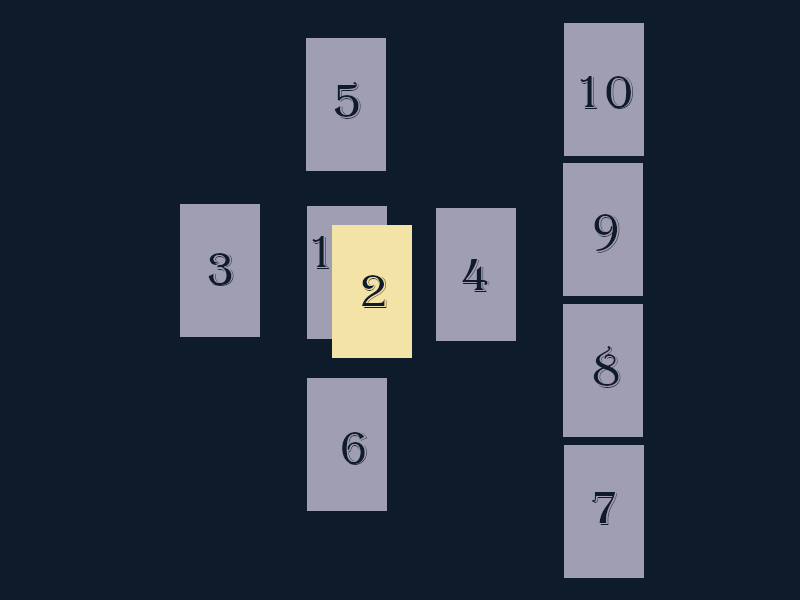
The Celtic cross layout. Ten cards, with some in a cross pattern, and the other in a line. The layout matters less than the numbers, which follows.
The Celtic Cross layout! Terrible graphic by me.

As I said before, I like using the Celtic Cross because it covers a lot of ground. You may get inspiration from an event you can introduce during the game, or it may remind you of an event in the past that you should drag up.

It’s a rather old layout (it’s first referenced around 1910, but it could be older? Or it could have been made up by the author. Tarot history can get wobbly), so you’ll find a ton of variations out there. This is what I came up with specifically for planning a game.

1: The current situation

This card is all about the status quo, or rather, a part of it. Is this aspect of ‘now’ something you can focus on? Maybe give players a moment to chill out in the present? Consider this card with the next card, which is…

2: An obstacle or challenge

This card covers the first card because it’s what is going to shake up the status quo. If the first card was a peaceful one, this could be what disrupts the calm. If the first card is gloomy and chaotic, this might be what makes it worse. In short, this card kicks the players in the pants.

3: The past

What happened in previous games, or before the game even started? Even if it’s the first session, a game has a past. The world existed before the PCs showed up (unless you’re playing a really out there system). This card might inspire you to bring this bit of history back for the players to deal with.

4: The future

What could be happening in the near future that you could drop hints about? This card deals with the immediate future. We’re talking weeks, not years. Unlike the second card, this is less a kick in the pants, and more a note that the players are scheduled to be kicked in the pants next month.

5: Current concerns

What are the players openly concerned about? A table of observant players are always worried about something. Someone finding that body. Losing position. That dragon finally showing up. This card might inspire you to press on something the PCs have openly worried about.

6: Secrets

Players also have things they tend to hide: A secret tryst, a worrisome bit of their backstory, a stolen trinket, a promise made behind closed doors, hidden feelings… What’s going on beneath the surface? This card might inspire you to drag that morsel into the light.

7: Advice

This one is pretty straightforward: What’s a piece of advice or a request that could be made of the PCs? I like working with this one because it can get the PCs moving in a completely different direction than they’re used to.

8: NPCs

Most games have a number of NPCs knocking around, doing their own thing. If this card reminds you of one of them (or a group!) maybe it’s time for them to come back and poke the PCs some.

9: Hopes / Fears

What are the players striving for, and what are they running from? If this card plays into your player’s deepest fears or furthest hope, now might be the time to play on those. After all, a fear isn’t worth anything if it never happens, and hope is for naught if it’s always just out of reach.

10: Outcome

Is this something you could hint at happening (especially in conjunction with one of the other cards)? If it’s good, you can use it as a carrot. If it’s bad, it’s what should be avoided. This card should not be taken as a given, since it’s only one of many possible outcomes. Players still need to work towards this if it’s positive, or against it if it’s a negative outcome.

Reading time!

Once you have your cards laid out, write down all of the positions and meanings, then start looking for things to jump out at you. I never use the whole reading, but rather pick a few cards that give me an interesting direction to move in. Maybe they’re evocative… but maybe they just remind me of something I’d been meaning to return to from a previous game.

I do recommend resisting the urge to do another layout if the current one doesn’t appeal to you. When you do that, it’s often because you’re looking for something safe, and that’s not why we’re here. We’re here to shake things up. So spend some time pairing up different cards/interpretations to see what might take your story forward in the most interesting way.

A sample layout

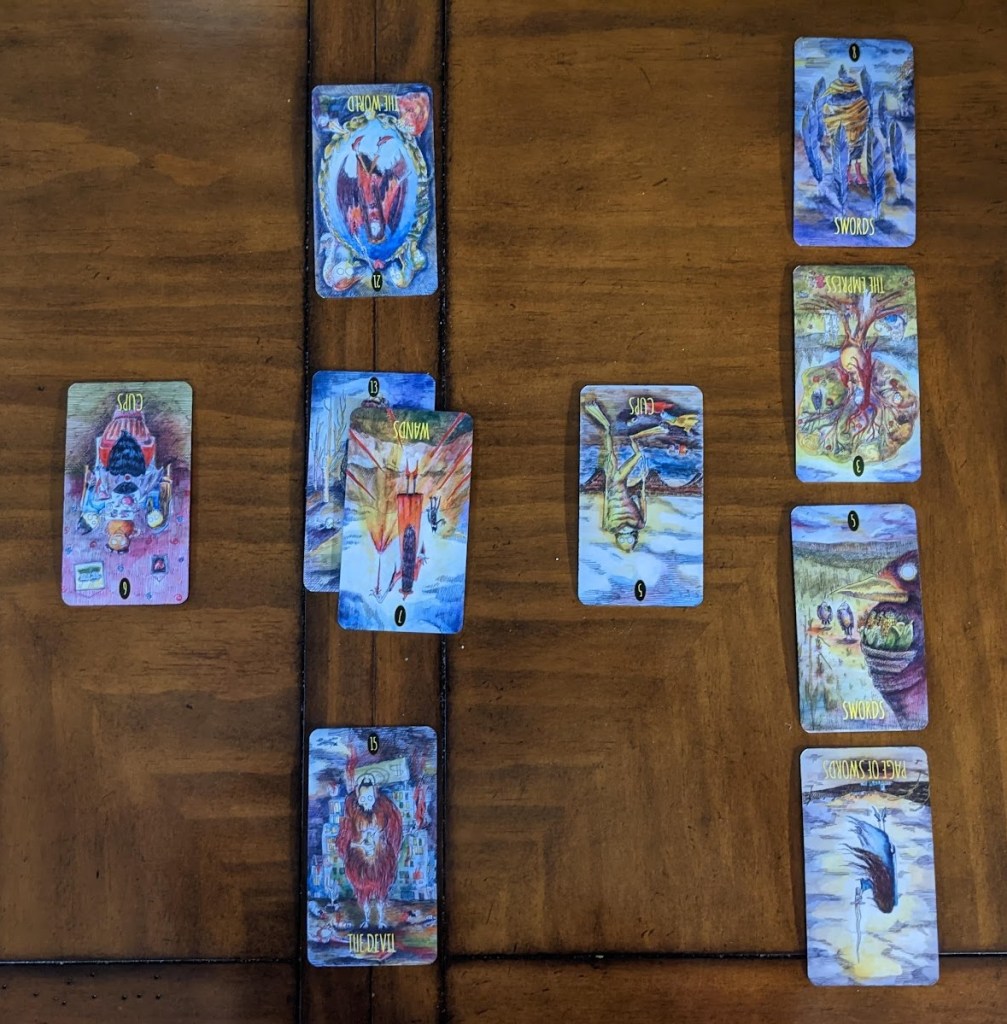
I tend to use this layout the most with my VTM games, since those tend to be less tightly plotted. Vampires have a tendency to make their own problems, so it’s often wiser to just set up a situation and see how kind the dice are to them that evening. This is the layout I drew for them:

The celtic cross layout I made. The cards follow in a table.
The deck, if you’re curious, is The Shadowland Tarot by Monica Bodirsky. Also, my 14yo upon seeing the spread: “Sucks to be them…”

First, I did a quick and dirty reading, which was just me writing down the cards, positions, and some of the meanings that stood out to me.

PositionCardMeaningInterpretation
SituationDeathEndings, change, transitionsI tend to run games in arcs. Could the game be ready for the next arc?
Obstacle7 of Wands, ReversedExhaustion, giving up, overwhelmedHas someone been pushed to the brink recently? Could we get them there?
Past6 of Cups, ReversedLiving in the past…Maybe an older vampire… One who’s been mentioned before?
Future5 of Cups, ReversedPersonal setbacks, moving onOnce again, maybe the players are meant to be moving on to a new arc…
Current concernsThe World, ReversedSeeking personal closureAre there any personal plots that the players want to see wrapped up?
SecretsThe DevilAddiction, restriction, sexualityMaybe poke the players’ baser natures, which they spend a lot of time repressing
AdvicePage of SwordsNew ideas….Someone could prod them to go in a new direction?
NPCs5 of SwordsConflict, winning at all costsCould that old vampire be looking to win at any cost?
Hopes / FearsThe Empress, ReversedDependence on othersAbsolutely something the group fears. Play on that.
Outcome8 of SwordsImprisonment, negative thoughtsSo the stick rather than the carrot: Something to work against, since the group tends towards being hopeful

After writing down all the meanings, I realized that I probably should kick off the next arc, which I’d been putting off. So many of the cards pointed towards change, decisions, and showdowns. In the end, it worked out perfectly: A (very, very) old Kindred showing up in town came looking for a place to settle (conquer), which kicked the crew into high gear. They were forced to band together and make some big decisions. Not only did they have to decide what to do with the old guy, but they had to decide what they, as a group, stood for.

Sure, I could have read the cards differently, but this methodology is all about inspiration and letting a mix of chance and context take you to new, interesting places.

Favorite Resources

One would think I’d have a ton of books about tarot cards, but when it comes to interpretation, I tend to prefer apps and websites.

Biddy Tarot: I use this site for card meanings, but also potential layouts. For quick readings, I love their list of three card layouts. They also have a great run-down of the Celtic Cross spread.

If I’m on the go, I use the app from Labyrinthos. It has a good database, and you can do a layout on your phone (and yes, it has reversed cards!).

The book that inspired me to use tarot for game planning was Corrine Kenner’s Tarot for Writers. A great book with some alternative layouts that are geared towards plot rather than traditional readings.

If I’m at my desk, I use this absolutely baller Google sheet (via Reddit) by u/adlist for looking up meanings, grabbed from various sources.

Physical cards: 100% optional, but if you decide to get a deck, make sure you get one with the traditional cards. That means 78 cards, major and minor arcana. There’s some decks out there that have their own system, which is fine, but I find that traditional cards Rider Waite set to be the most varied. Llewellyn Publications makes some super nice sets, and tend to be my go-to.

An alter cloth: Even if you’re not into new age, there’s a very good reason to get a piece of cloth to read on: It protects your cards. You don’t need anything fancy! I’ve used t-shirts and dishtowels when I’m not sure if my my table is perfectly oil-free.

Adventure Path maps, VTT, and minimizing heartburn

I love Paizo APs. Like, adore them. I think they’re one of the best parts of diving into the Paizo culture: Ready-made adventures with tons of maps, NPCs, creatures, and twists that still give players a huge amount of freedom to do what they want.

The maps, though. Oh lord.

The older APs weren’t built with VTT in mind, so the maps tend to be quirky: Great for print, bad for VTT. Damn near impossible to rip out of a PDF. A grid that doesn’t align to a grid. While the later PF1 APs improved a bit, the earlier ones can be a headache. However, the APs are absolutely worth running, so here’s how I reduce (not obliterate, I’m not a VTT miracle worker) the pain.

Spoiler warning

In order to make a post about old Paizo maps, I have to use old Paizo maps. I’m going to be using the maps from the Council of Thieves AP, since it has some fairly complex maps in it, and it’s what I have on hand. So, mild spoiler warnings for an AP that’s been out for over a decade.

Extract the maps

I’ve tried so many tools for extraction, and if you have one you like better, you do you. The one I tend to come back to, though, is TokenTool from RPG Tools. It’s made for tokens, but you can also use it to get maps out. I’ve tried a bunch of tools, but this is the only one that seems to get the images out without too much struggle.

Step 1: Clear your screen

For some reason, we start with a gear token and a lady doing yoga. Let’s get rid of them (or whatever you were working on previously).

What you see when you load TokenTool

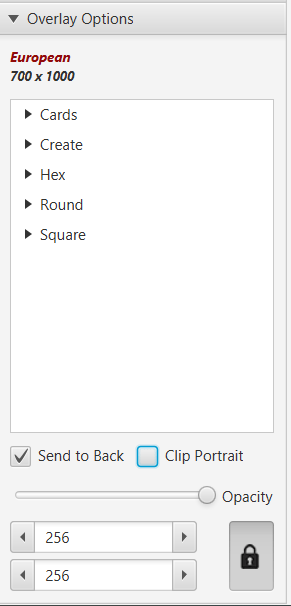
On the right-hand menu, make sure you have “Overlay Options” expanded. Click “Send to back” and deselect “Clip Portrait.”

Correct overlay options…

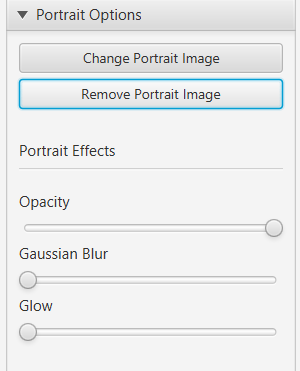
Next, expand “Portrait Options” and click “Remove Portrait Image.” Bye, yoga lady.

Button for Portrait options

Step 2: Get the maps!

Now, we want to open the PDF you’ll be grabbing maps from. I’ll be honest: This part can be a wee bit clunky, so I recommend putting on a podcast and grabbing all of your maps in one go.

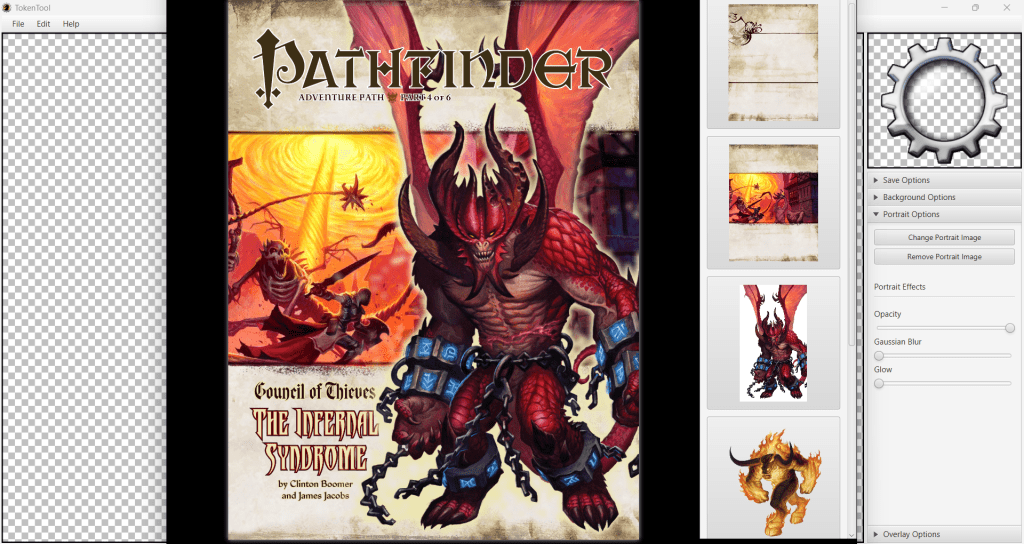
When you open a PDF in TokenTool (under File, or using Ctrl+O), the PDF will appear on in a new window, with two panes: The left-hand pane is the page of the PFD, and the right hand contains all of the images on that page. To get to a new page, scroll over the left-hand pane. No, there’s no jump option (that I could find), so some patience is a virtue here.

Book four opened in TokenTool

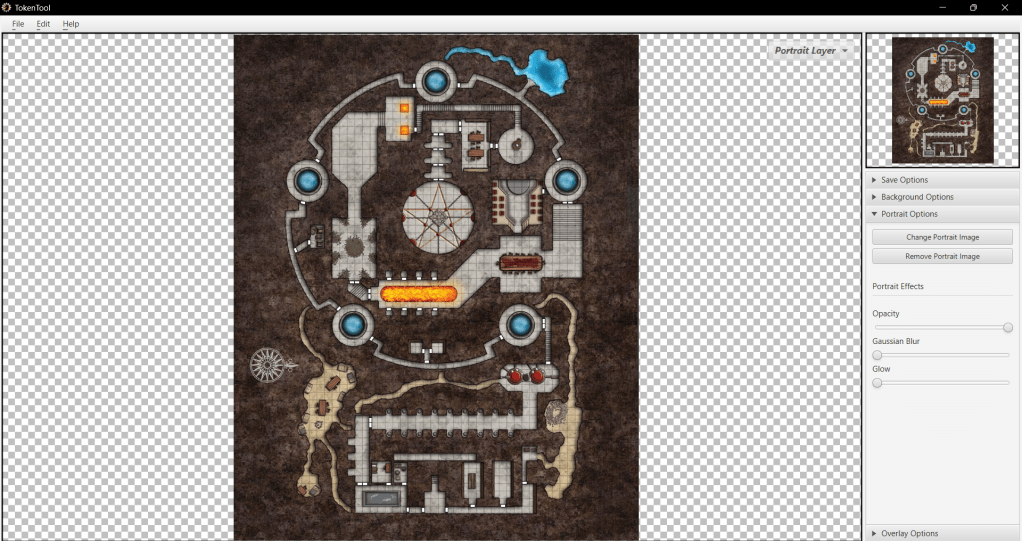
Once you get to the page with your map, click on the right map to insert it into the main TokenTool window. Now, this is important: When you export the image, the image will be cropped to what you see in the preview window. So make sure your whole map is showing by scrolling in or out!

A properly scrolled map!

Now, save. And maybe go get the rest of your maps while you’re there, since the PDF window is probably still open.

Upscale!

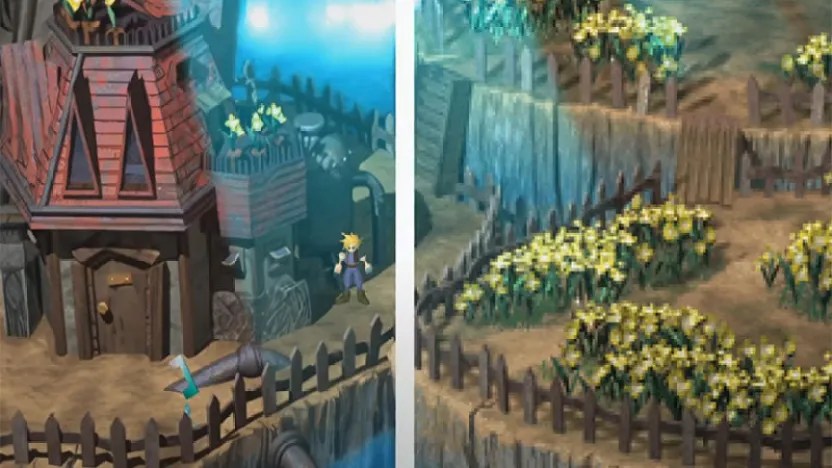
First, let’s be clear on what “upscaling” is. It’s not just “making the image bigger.” It’s doing so with some intelligence (specifically, Machine Learning). A great recent-ish example of this is the fan-mod for FF7 original, where someone upscaled the textures.

FF7 comparison, via Kotaku

There are many, many tools out there for upscaling. The one I’ll be using is from Icons8, mostly because I can pay $0.20 per image rather than paying a monthly fee. Given that most APs have only a handful of maps, it’s well worth the investment for me.

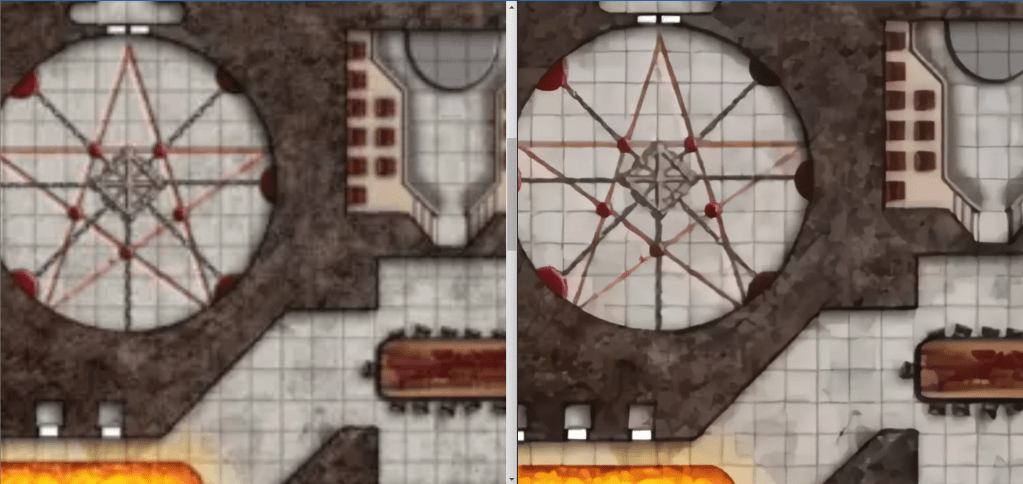
All you have to do is upload your map, and Icons8 will do the magic! I do recommend upscaling to 4x, since 2x is still a bit too small for most VTTs, if your players like to be zoomed way the heck in.

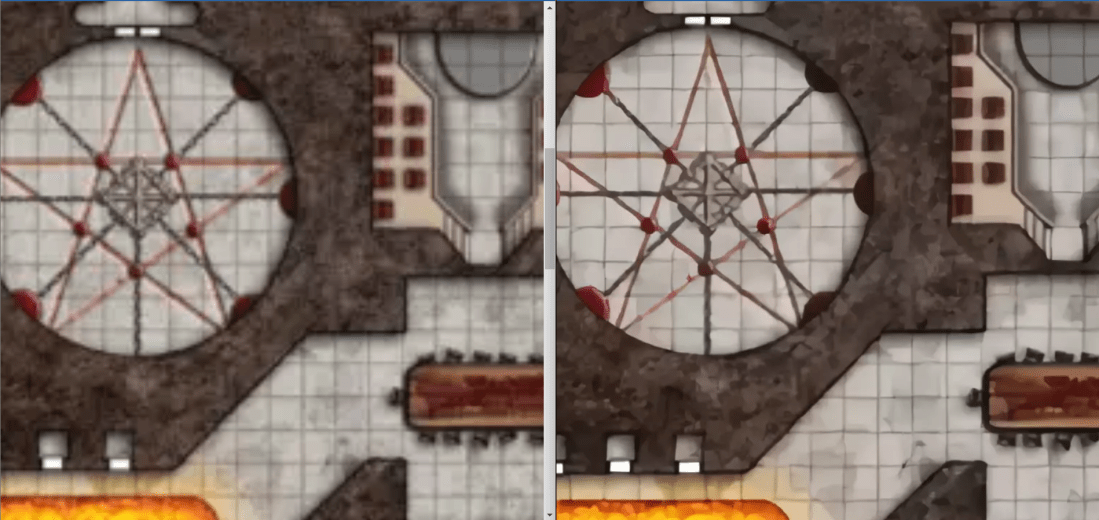
Left: Original. Right: Upscaled.

Some notes: It’s technology, not magic, so it’s not perfect. The end result for most maps tends to look like someone painted the map with oil paints, which I kind of dig. If it really, really bugs you that the chairs are wonky, at least you have a better image to work from.

That darn grid

Some people aren’t going to like this tip, so I’ll go ahead and put it first: Get the grid somewhat lined up… then turn it off.

For most VTTs, this doesn’t mess with measurements, but you will have to warn your players to stay ON THE GRID. For the vast majority of players, this isn’t a huge problem. Yes, there are all sorts of finicky tricks about how to get the grid to line up perfectly, but this post is about decreasing heartburn, not making new and interesting heartburn issues.

If most of the grid fits, but one or two rooms are off, cut them out, and place them on the map layer, one by one. Nudge them around until they line up well enough. If you’re using dynamic lighting of some kind, chances are your players will never notice the seams. If they do, give them a Hero Point or something to make up for shattering the illusion that they were really in a dungeon.

Note that I recommend doing this on the VTT itself. I’ve found it easier than stitching together the whole thing in Gimp and hoping I got it right, only to find out I was off by a few pixels.

Anyway, that’s my process for extracting old images and making them less eye-bleedy for VTTs. Hope it encourages some of you to check out some older APs!

Population Generator: A script for filling a fantasy town

Hey, I made an online version of this that doesn’t require installing Python! Go check it out!

One of my biggest issues with towns in TTRPGs is that they lack a certain amount of life… literally. I’ve played in huge metropolises and tiny hamlets, and outside of the goods and services available, they’ve felt the same. There’s that one merchant you talk to, that one tavern you know about, and a handful of NPCs that are fairly interchangeable.

As a GM, I’d love to have a town where everyone has a name and a personality. I don’t really have the time to put that together by hand, though. I’m also wary of dumping a huge amount of time into something that my players may simply ignore. I could just make it up as I go along, but I’m terrible about writing down improvised details while in the heat of the moment (this is how a certain shopkeeper in one game ended up with at least four different names).

Ideally, I’d want something to do the work for me, naming my NPCs, giving them personalities and businesses, naming said businesses, and then handing it off to me to use if needed.

Enter the town generator!

Generating random sets of things is something that code is perfect for, so I decided to put together a script that could do it for me. My goals for it:

  • Create a town of N size
  • Populate it with residents
  • Give those residents values to give them some character (age, traits, a wealth level, a job)
  • Give some of the residents a family
  • Pop residents and their family (if any) into a building of some sort
  • Name the taverns and shops
  • Print the whole shebang out to a CSV, so the user can open it in Excel / Google Sheets / whatever

I tinkered with it for a few days, putting in work during coffee breaks and when I had a fit of inspiration. I grabbed a few random data sources, like a list of traits from a researcher at MIT and a bunch of medieval names from an online database. I also spent a bit of a time refreshing random word generators to get some data for my building names.

The results

I ended up with a script that did just what I wanted: Creates and populates a town with residents and businesses! You can see the results of one of the towns I made here.

One of the things I’m enjoying the most are the emergent stories. I considered putting in certain requirements (like a town must always have at least one shop or at least one temple, or can’t be made of only children), but decided against it. For one, it started to feel like a bit of a rabbit hole (why not check the types of temples, or traits that don’t go together, or not having any middle class, or…). But it also created some interesting stories when outlier cases popped up.

For example, in one town I generated, there were a TON of temples. Out of some 300 buildings, 100 of them were a temple of some kind (the normal ratio would have been much lower). What’s going on in a town like this?! Maybe there’s a ton of factions. Maybe the residents follow some of the lesser known gods, or have their own totem spirits. Or heck, maybe they’re all charlatans! And what’s going to happen with that single noble lady who has five sons, all with traits that are at odds with each other…?

The traits also create some fun stories. Each resident is given three random traits. This can lead to a person having traits that are at odds (miserly and generous), or traits that seem at odds with their station (a field hand who’s fancy or a noble who’s rustic). Sometimes, you end up with a marriage where you wonder how in the world they make it work. These just make the people in the city feel a bit more unique and alive. Also, since I’m working with traits and not a block of text, it’s easier to take in during an active session and key off of.

Finally: The business names. I adore the business names. Some of my favorites so far:

  • The Actually Ass tavern
  • The Tripping Chicken
  • The Wishing Wyvern
  • The Half-Elf’s Half-Elf

And the not-safe-for-younger-players:

  • The Wet Wife tavern

Will I use it?

My current campaign takes place in a single city, and my players aren’t in the habit chatting with the locals, so not any time soon. That said, I may go ahead and  run it just in case.

My next planned campaign is a West Marches campaign on Roll20, however, so I’ll likely break it out then. It’s set in a small settlement, but there’s still going to be people bumming around.

What’s planned for it?

Some of the things I’d like to add:

  • Races. Right now, races aren’t a set thing. I’d like to add them in, though I’d like to only do this once I’ve found enough names to add that are actually easy to pronounce
  • A web interface. I’d love for this to not be limited to just people who can run Python.
  • A settings file, so people can tweak the percentages without changing the code.
  • More data!
  • A Python 3 version 😬

Where can I find it?

It’s part of my gamemaster-scripts repo, but if you’re just looking for the files for this script, you can find them here:

https://github.com/kcunning/gamemaster-scripts/tree/master/general/popgen

To run it, you’ll need Python 2.7 installed and the files on your computer, but that’s all. There are no external packages required. If you have an account on Github, feel free to send me a pull request!

Note: Lovely tavern sign created with http://apps.pathstoadventure.com/Tavern-Sign-Crafter/craft.asp